Start by asking ChatMore to read only the visible text in your screenshot. Then ask one focused question: explain a chart, summarize a note, compare products, or suggest checks for an error. Keep the original screenshot so you can compare the answer against it.
This guide covers the steps after you choose a screenshot. For feature details, see the AI screenshot analyzer; for reusable questions, use the screenshot prompt library.
Use a five-step screenshot workflow
- Crop first: remove unrelated content and redact sensitive details.
- Describe: ask ChatMore to state only what is visibly present.
- Question: request one outcome, such as an explanation, comparison, or checklist.
- Check: ask what is uncertain, cropped, unreadable, or missing.
- Act: turn the checked answer into a reply, plan, search, or next step.
An example brief
- 01 · InputBring context
One readable chart, error, or instruction screenshot
- 02 · RequestAsk a focused question
List visible facts first, then interpretations and unanswered questions.
- 03 · CheckReview the result
Check cropped labels and important details in the original source.
What screenshots are worth analyzing?
The best screenshots are the ones where the visual layout matters. If you would need several sentences to describe what you are looking at, it is probably worth using the screenshot directly.
- Charts, dashboards, and reports where you need the main takeaway.
- Error messages, settings screens, or app flows where you need troubleshooting help.
- Product pages, reviews, and comparison tables where you need a decision summary.
- Notes, documents, and study material where you need a simpler explanation.
- Designs, images, or layouts where you want feedback or improvement ideas.
Ask the AI for the outcome you want
The screenshot gives context, but the question still matters. "What is this?" can work, but a more specific request usually gives a better answer.
Better prompt: "Analyze this screenshot. Summarize the key point in plain English, list anything that looks important, and tell me what question I should ask next."
For a chart, ask for trends and caveats. For an error, ask for likely causes and fixes. For a product comparison, ask for tradeoffs. For a design, ask what is clear, what is confusing, and what should be improved first.
Fix small text before asking for conclusions
If labels or numbers are too small, add a closer crop of that part alongside the original view. Keep chart axes, units, dates, and legend visible. For an error, keep the full error wording and app name.
Ask ChatMore to mark unreadable text as unknown. Compare every important number with the original image; enlarging an image cannot recover details that were never captured.
Read the visible labels and numbers first. Mark each unreadable item as unknown. Do not estimate cropped values. Tell me which closer crop would help answer my question.
Turn a screenshot into a checked next step
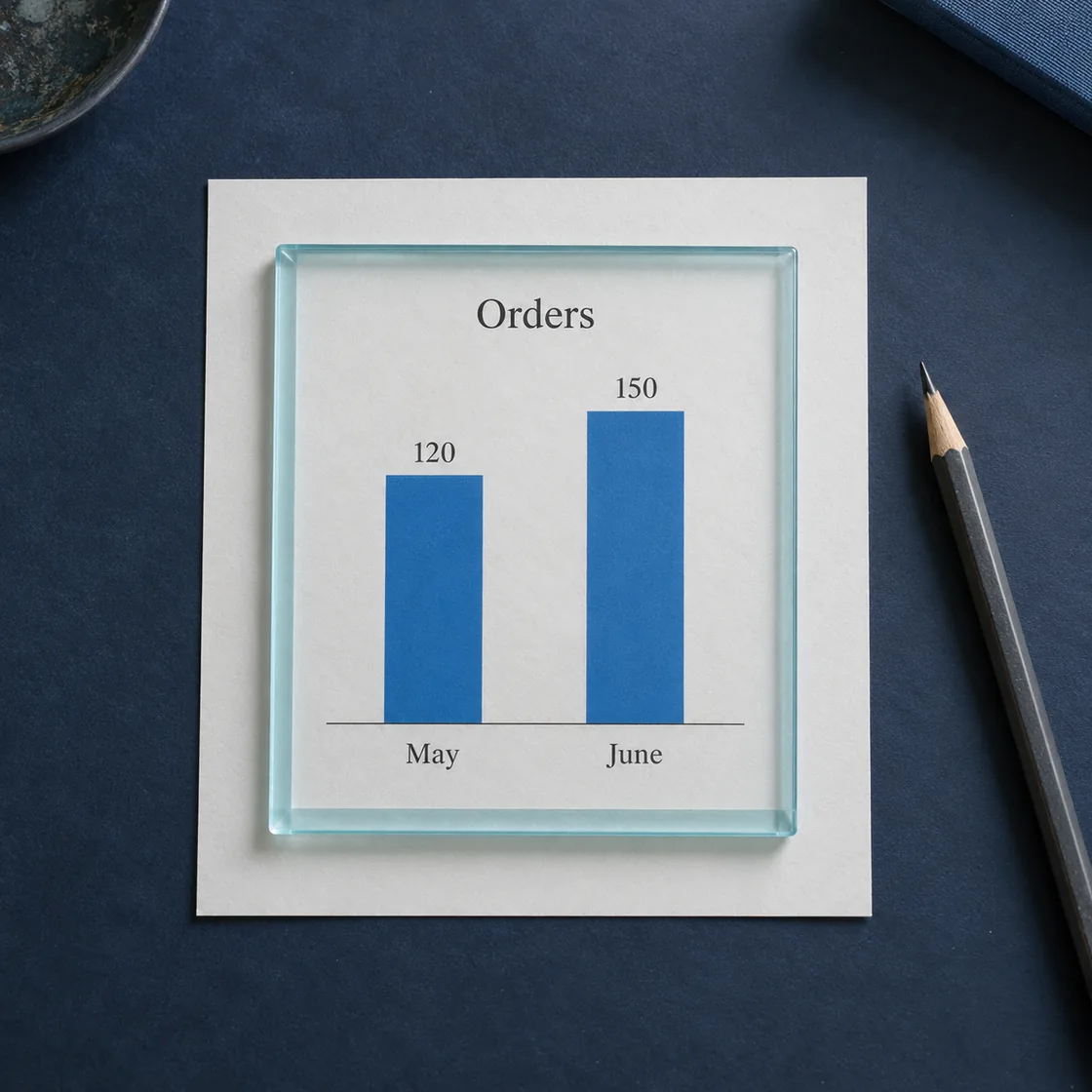
Illustrative example: a chart shows 120 orders in May and 150 in June, with no information about refunds or revenue. The visible change is 30 orders, or 25% relative to May. That alone does not establish a revenue increase or explain the cause.
- Ask for the visible values, dates, labels, and units.
- Ask for the calculation and its denominator.
- Check the arithmetic independently.
- Ask which missing details would change the conclusion.
- Write a next step: check refunds, order value, and campaign dates before deciding.
Separate visible facts, calculations, interpretations, and unknowns. Show the arithmetic. Suggest one next check; do not invent a cause for the change.
Separate visible facts from interpretation
Ask ChatMore to describe visible words, numbers, labels, dates, buttons, and layout before drawing a conclusion. Then ask it to label interpretations and uncertainties separately. This matters when a screenshot is cropped, blurry, missing earlier messages, or showing only one part of a process.
For a text conversation, AI can summarize visible statements, questions, decisions, and tone cues. It cannot know hidden intent, missing context, whether a claim is true, or what another person privately meant. Use neutral wording and verify important conclusions directly.
Useful screenshot prompts
For charts
"Explain this chart to a non-expert. What changed, what might be driving it, and what would you check before making a decision?"
For errors
"Look at this error screen. What does it likely mean, what are the first three things to try, and what information would help diagnose it?"
For shopping or research
"Compare only the visible details in these options. List differences, missing information, and what I should verify before deciding. Do not assume the shown price or availability is current."
Use web context when the screenshot needs current information
Some screenshots need recent context. A product page might have changing prices. A news image might need current sources. A software screen might need updated documentation. In those cases, move from screenshot analysis into AI web search so ChatMore can help with source-backed follow-up questions.
Follow up instead of starting over
The value is not just in the first answer. After ChatMore explains the screenshot, ask follow-up questions. Ask it to make the answer shorter, turn it into a checklist, compare two options, write a reply, or create a plan. This is where screenshot analysis becomes a workflow instead of a one-off feature.
Crop or redact sensitive details first
Remove passwords, payment information, account numbers, private contact details, medical information, confidential work content, and unrelated personal data before uploading a screenshot. If a detail is not needed for the question, crop it out.
Frequently asked questions
Can ChatMore analyze a screenshot on iPhone?
Yes. Add a screenshot in ChatMore, ask it to describe what is visible, then request an explanation, summary, comparison, or next step.
Can AI analyze a screenshot of a text conversation?
AI can summarize visible words, questions, decisions, and tone cues. It cannot know hidden intent, missing context, whether a claim is true, or what another person privately meant.
What should I remove before uploading a screenshot?
Crop or redact passwords, payment details, account numbers, private contact details, medical information, and unrelated personal content.
What if the screenshot text is too small to read?
Add a closer crop alongside the original view, keeping labels, units, dates, and context visible. Ask ChatMore to mark unreadable details as unknown, then check important numbers against the original.
Analyze screenshots with ChatMore.
ChatMore helps you ask AI about charts, errors, notes, designs, product pages, photos, and visual context from your iPhone.
Download ChatMoreSources and product details
ChatMore publishes this guide. Product features, availability, limits, and prices can change; consult the current official information before choosing a plan.